Available now · macOS (Apple Silicon + Intel) & Windows
The trading terminal
India never had.
Order-flow detection, options analytics, honest backtesting and an AI copilot — on your own broker account, no cloud in between.
No new demat. No funds with us. Your broker executes everything.
Latency lives at your broker.
Everything else is on us.
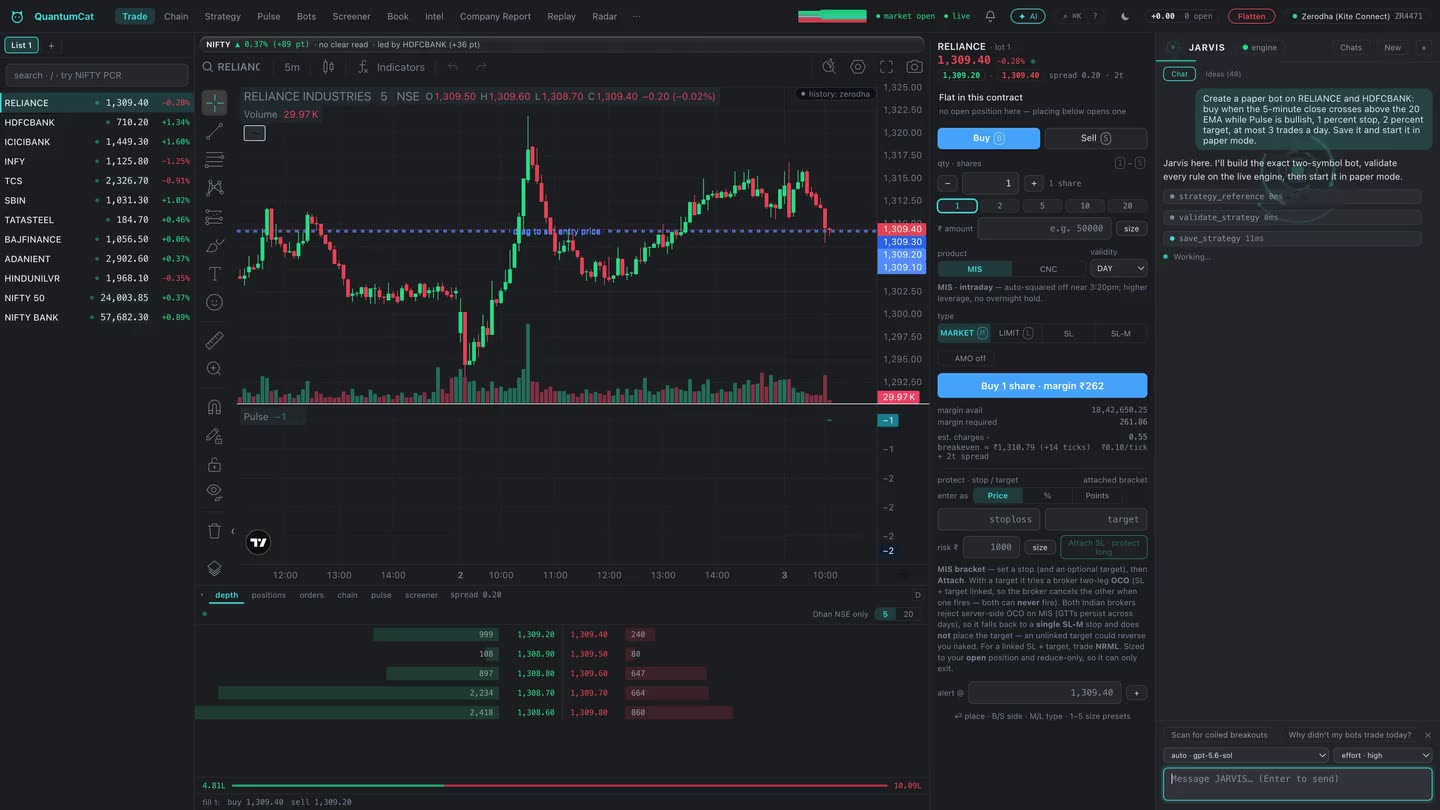
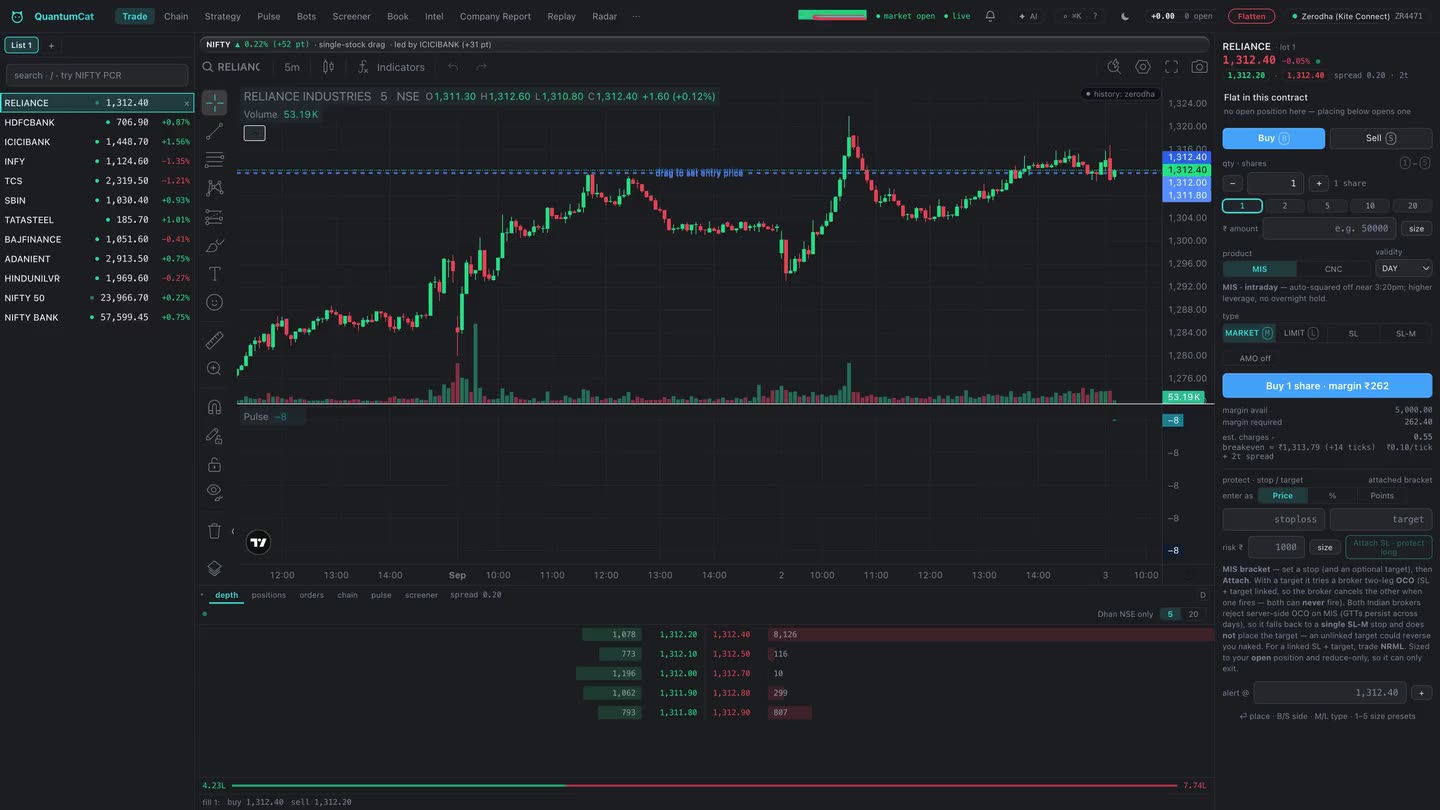
You can't control exchange latency — so QuantumCat attacks the slower half: the seconds you spend clicking through order windows. A Rust core, a warm broker connection, and a ticket you never have to click.
One-keystroke orders
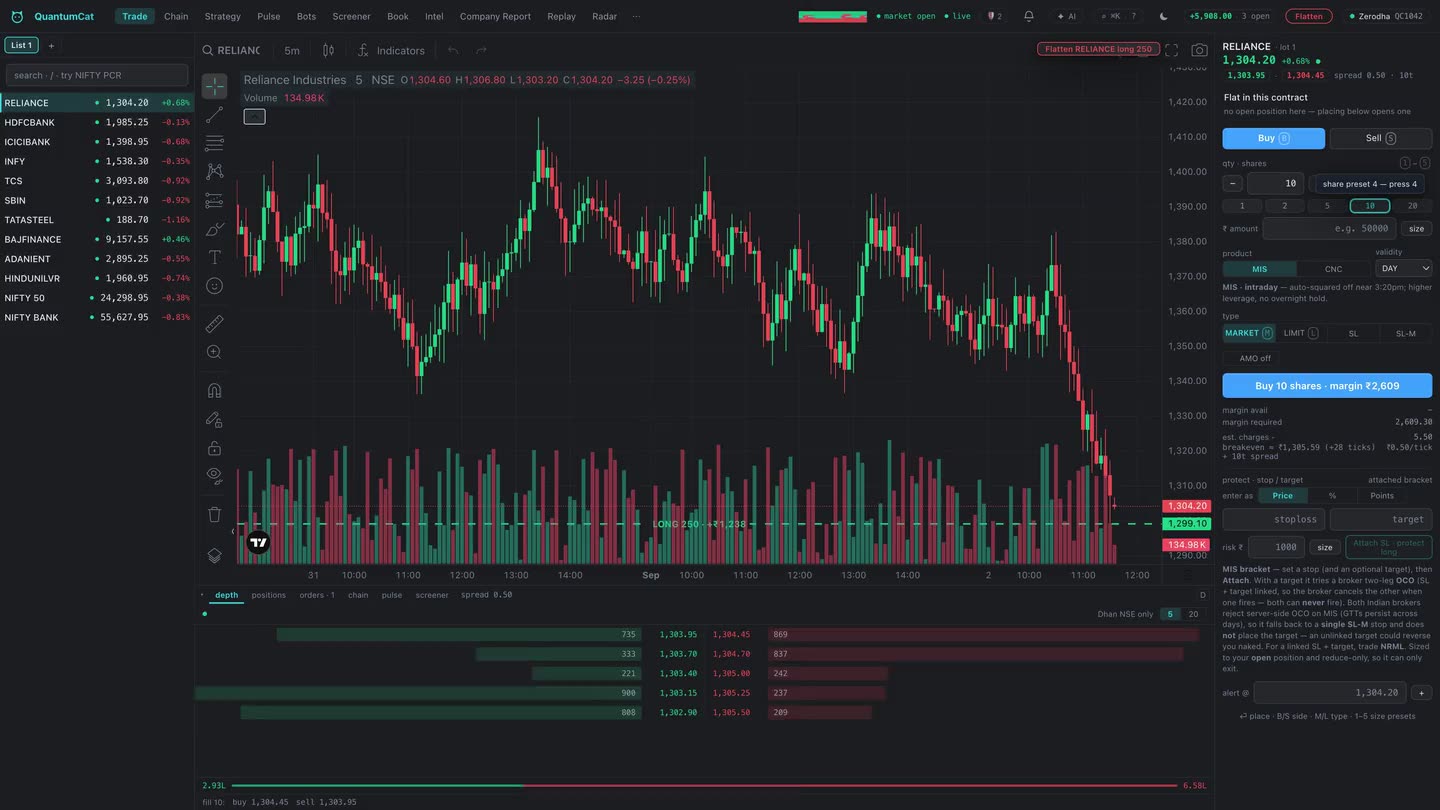
B/S to flip side, 1–5 for your five saved lot sizes, ⏎ to fire. Your favourite quantity is pre-loaded before you even think about it.
Size by risk, not by guess
Type the ₹ you're willing to lose and the stop distance — the ticket computes the lots. Margin (SPAN + exposure) updates live as you change it, red before the broker would reject you.
See your fill before you take it
QuantumCat walks the order book for your exact size and shows the average price and slippage you'd actually eat — before you press buy. Priceless on illiquid strikes.
TradingView charts on your own tape
The full TradingView Advanced Charts library, drawing on a tick stream recorded to your own disk as you trade — the same archive that powers your backtests and market replay.
The chart is the cockpit
A live position line rides the chart — average price and running ₹ P&L where your eyes already are. Grab the stop or target line and drag it; release, and the working order is modified to the new price.
A command bar that keeps up
⌘K takes commands, not just symbols: RELIANCE OI jumps to its chain, NIFTY PCR to positioning, TCS NEWS to its filings. The terminal keeps up with your hands.
Discipline, wired into
the moment of entry.
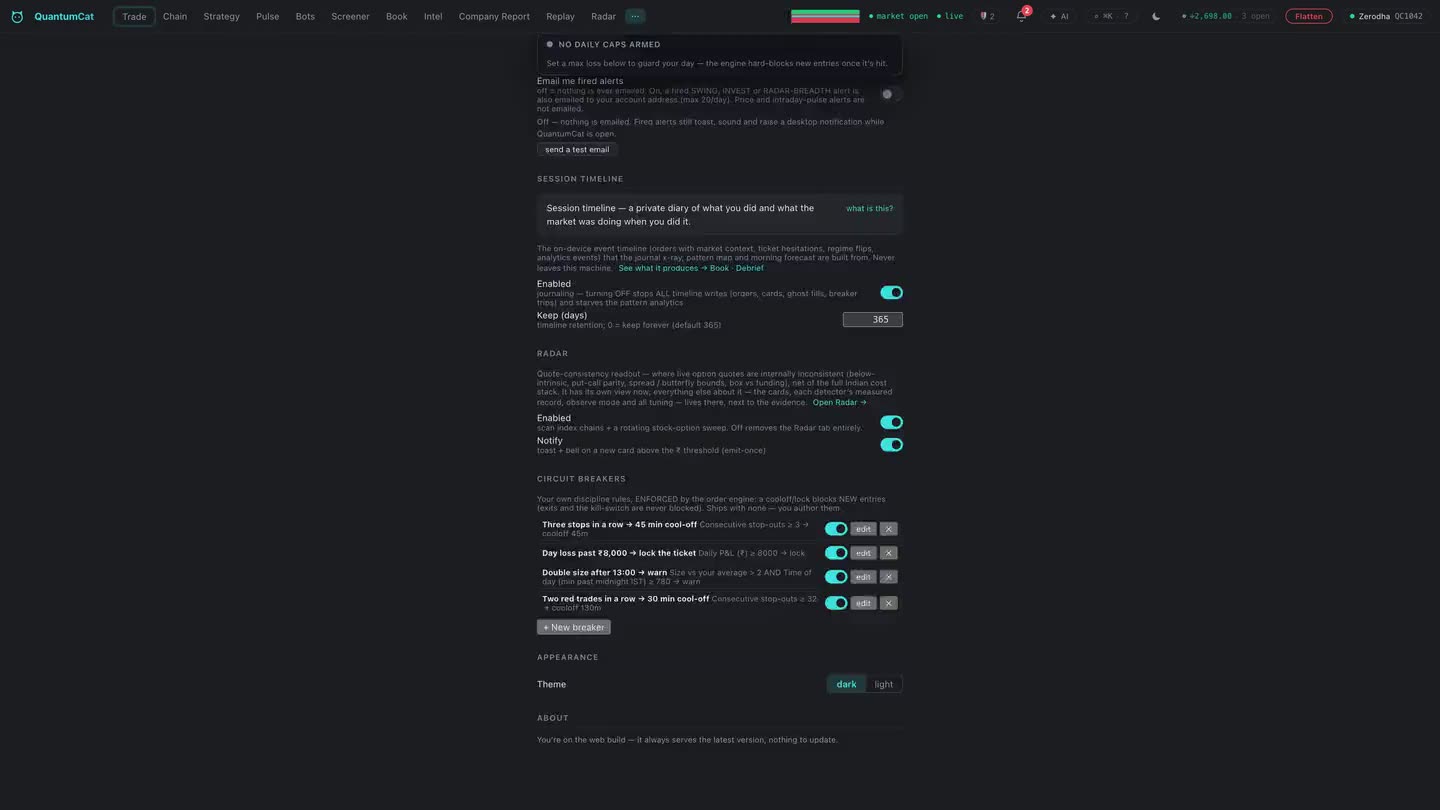
Most trades die from a missed exit, not a missed entry. In QuantumCat the exit plan lives on the same surface as the entry — and every protective feature is labelled honestly: broker-side, or needs the terminal running, so you always know exactly which guarantee you're holding.
The exit plan rides the ticket
Stop-loss and target are part of the entry form itself, with exit legs priced through the trigger so they fill across gaps instead of resting there. One surface, one confirmed action — no re-typing strikes with the position already open.
Manage the position, not the forms
Break-even in one tap, scale out with ½-position closes, flatten only winners or only losers. The position workflow is buttons, not order forms.
Every order, one book
Standing triggers, trails, alerts, open orders and positions in one Book view — with status, arm-then-confirm on anything destructive, and inline modify on working orders.
QuantumPulse
Big money leaves footprints.
Now you can see them.
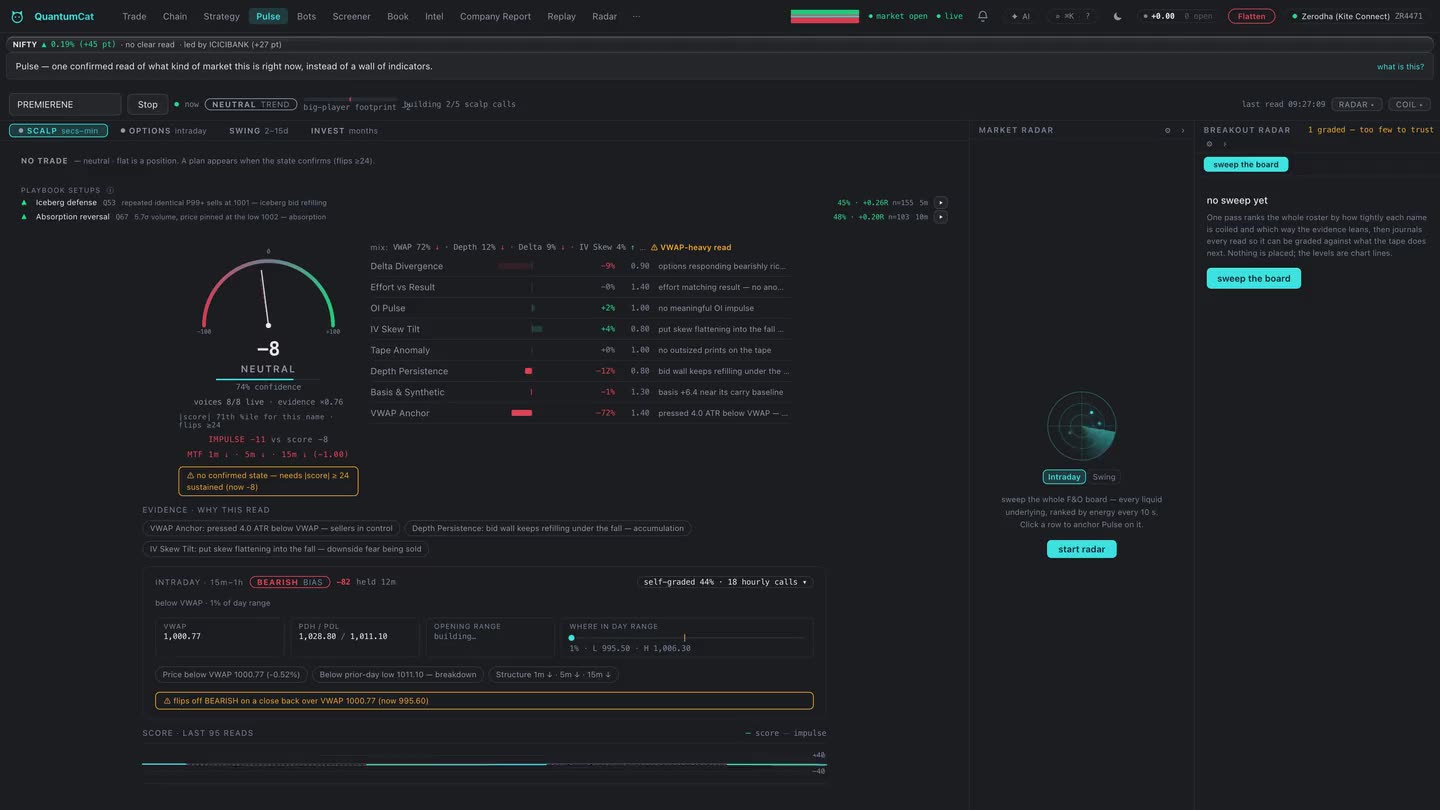
When institutions work large positions, the tape, the order book, the option chain and the futures basis all bend in small, measurable ways. QuantumPulse runs eight live detectors over your own broker feed and fuses them into one honest score — with the full breakdown of why, every second.
- Delta divergenceoptions repricing slower than the index move implies — absorption
- Effort vs resultheavy volume that can't move price, and CVD divergence
- OI pulsewho is writing puts into a fall — per-strike, per-second
- IV skew tiltfear being sold while price drops
- Tape anomalyP99 prints and iceberg refill signatures at one level
- Depth persistencebid walls that survive being approached
- Basis richnessfutures premium expanding against the fall
- VWAP anchorsweep-and-reclaim, the institutional re-entry
Decision support, not advice. QuantumCat never tells you to buy or sell — it shows you what the tape is doing and lets you decide.
The context pros keep
on a second screen.
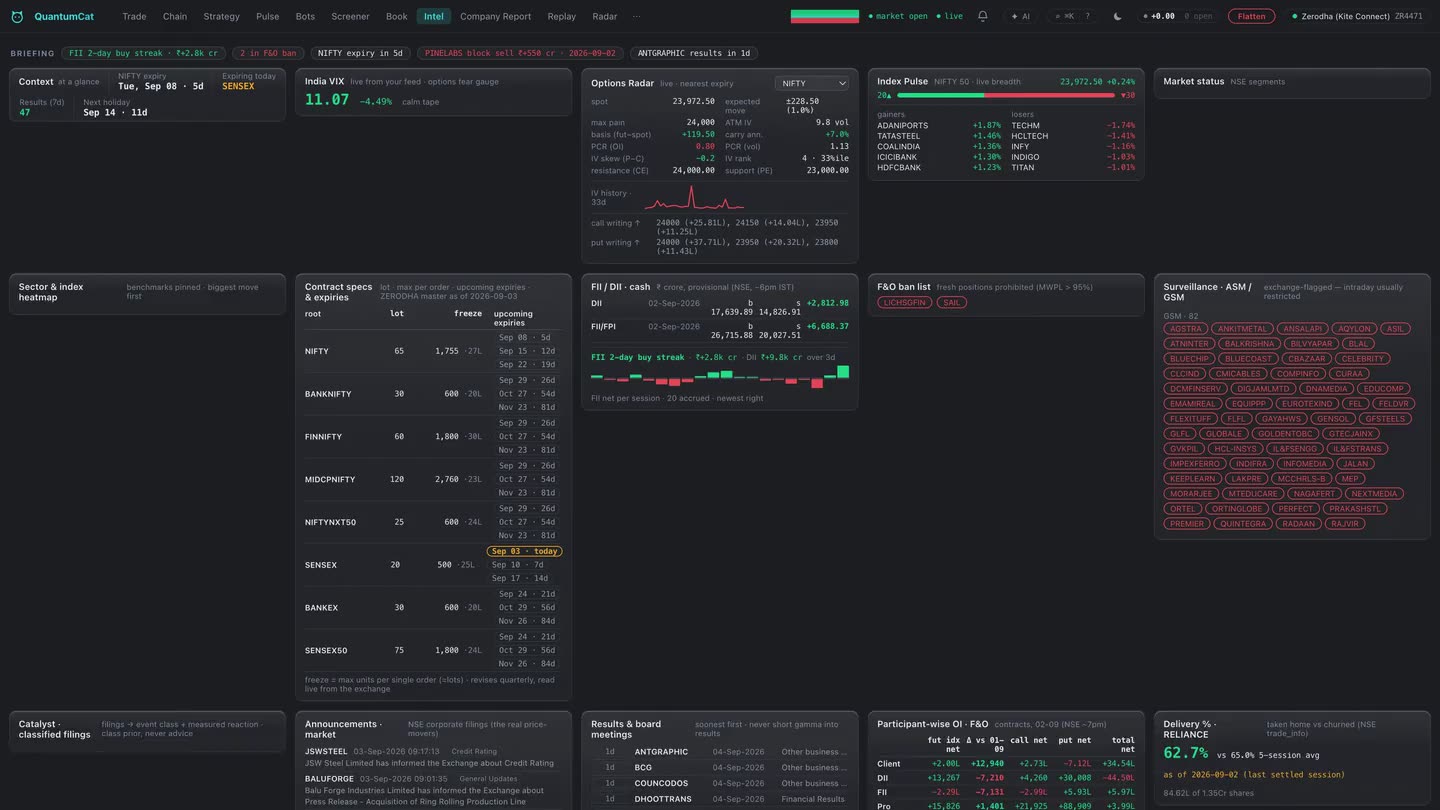
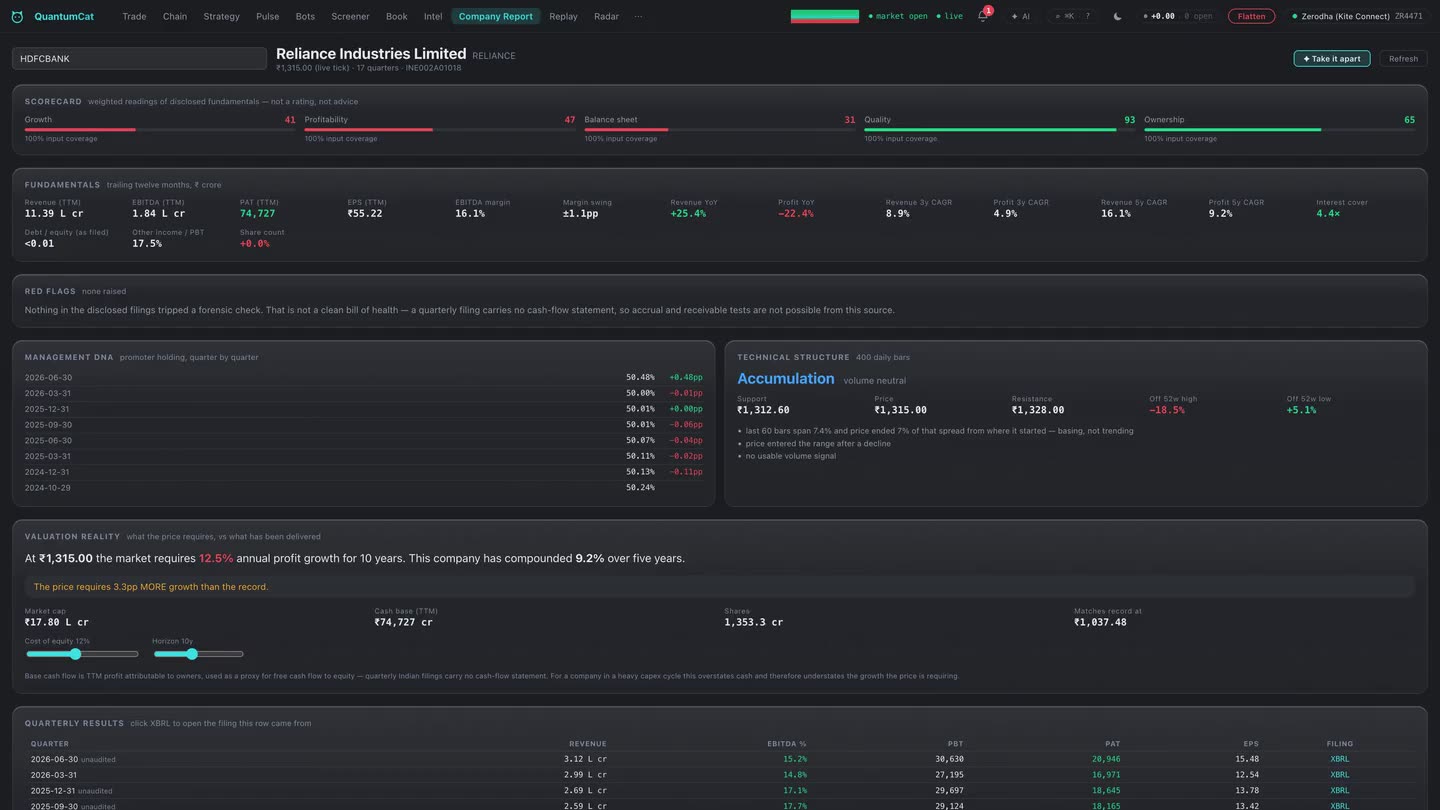
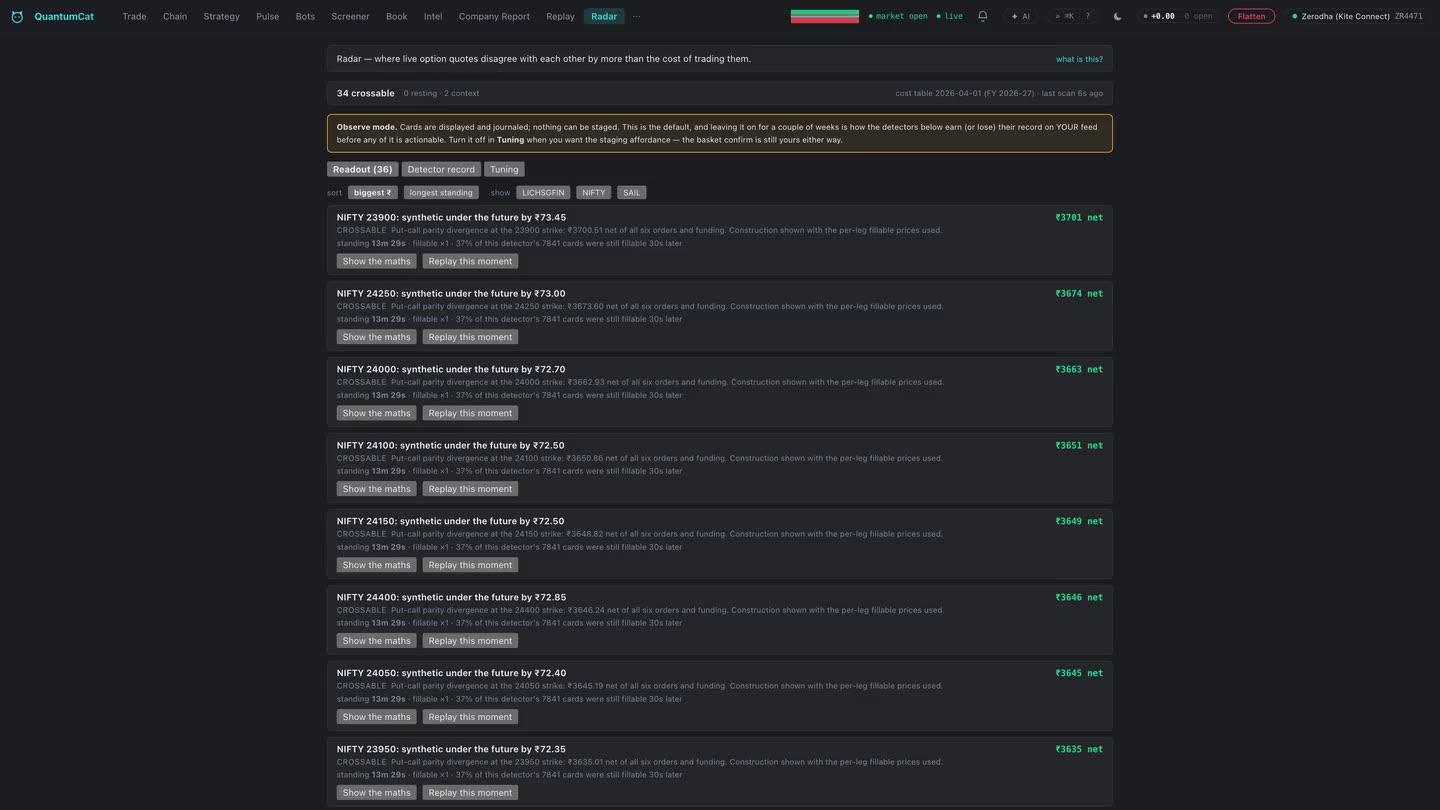
FII/DII flows, the F&O ban list, results dates, OI positioning — the context around every trade, computed from your own feed and NSE's own publications, beside the ticket. No tab-switching mid-trade.
Simulated preview — in the terminal these cards run live off your own broker feed.
Options radar, live
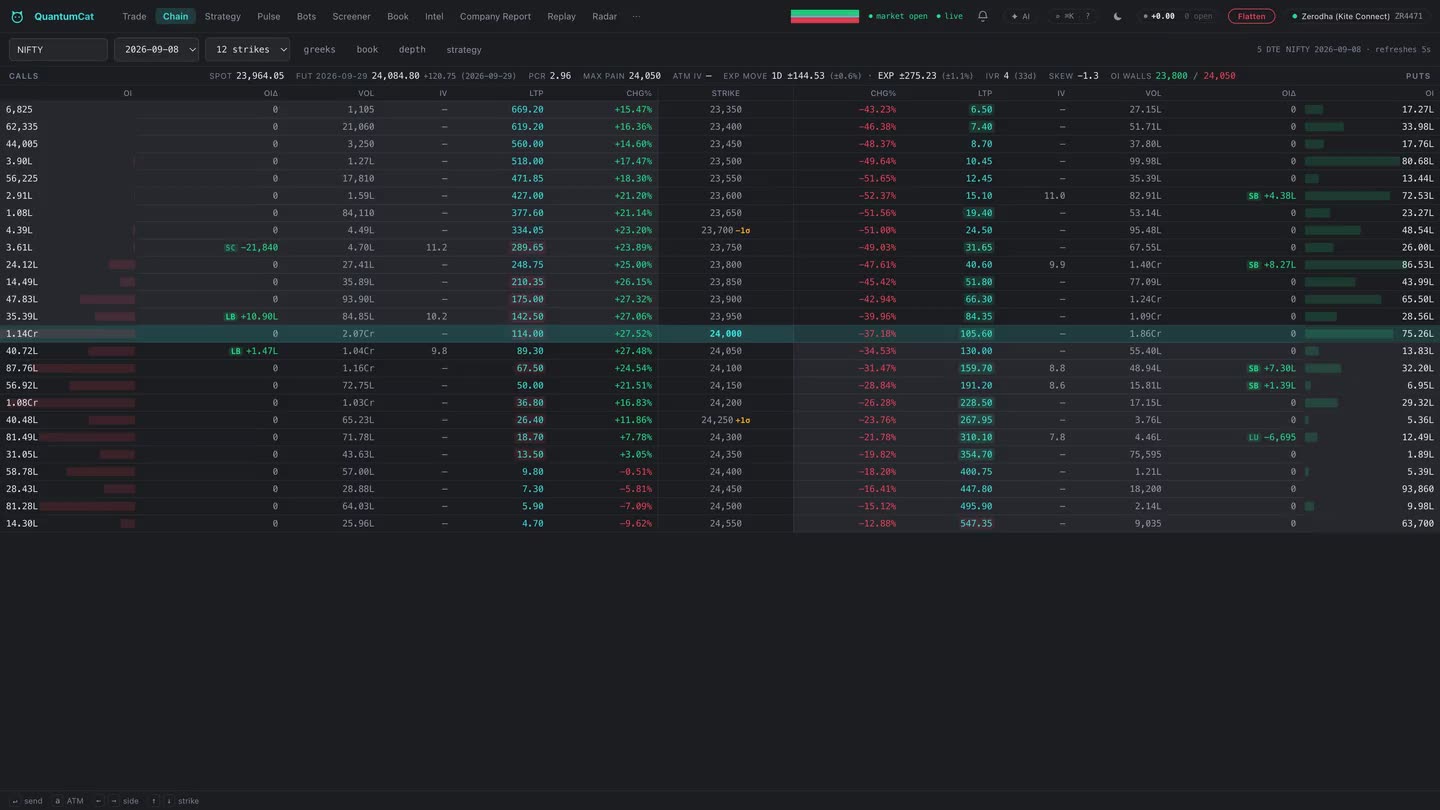
Expected move from the ATM straddle, max pain per expiry, PCR by OI and by volume, IV skew, OI walls — recomputed from your own chain feed while you're in the trade.
IV rank that becomes yours
From install day, the terminal records ATM IV daily per underlying to your own disk. A few weeks in, you have an IV-rank history that is yours — it compounds every session you run.
Greeks & payoff, one surface
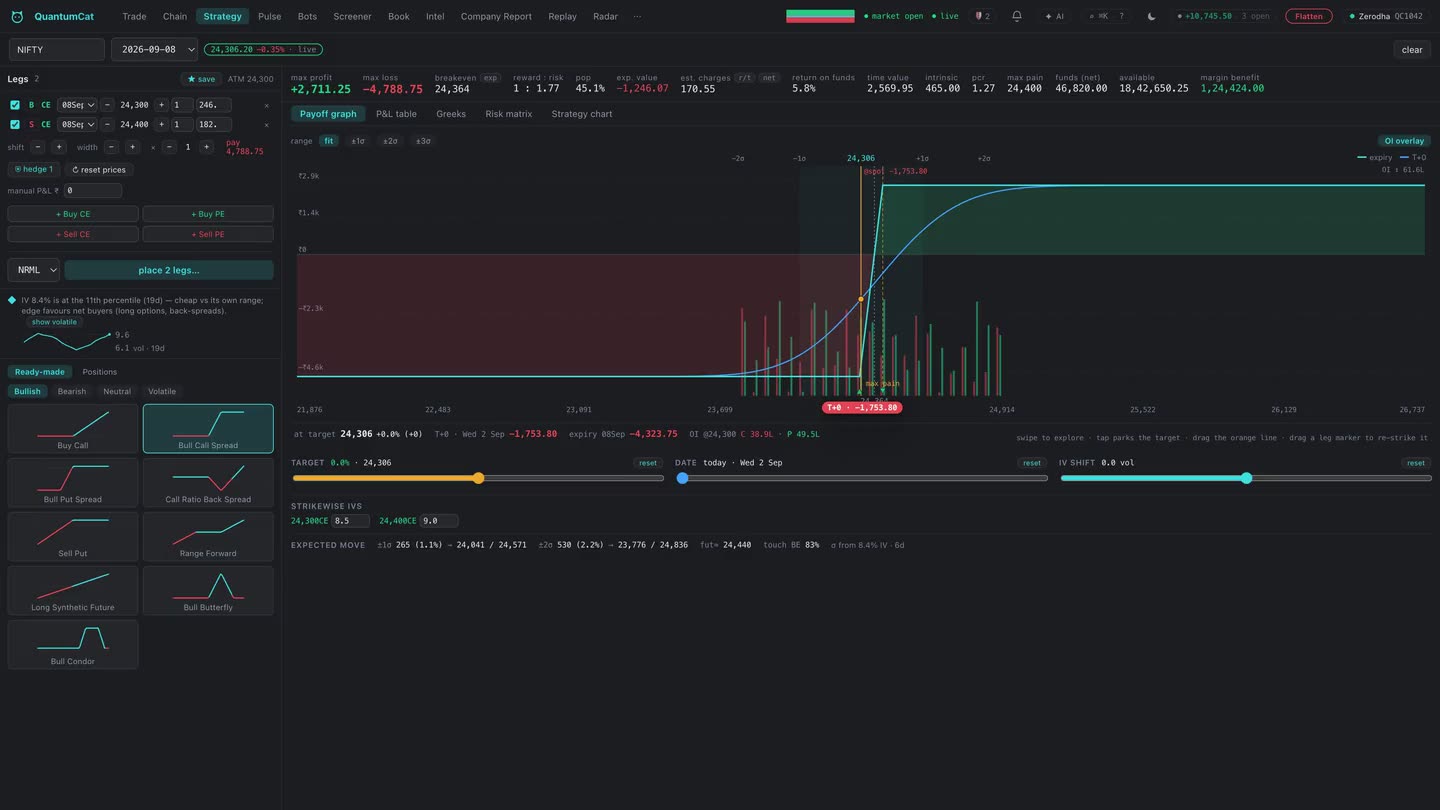
Per-strike delta, gamma, per-day theta and vega across the chain, a payoff builder that places every leg in one confirmed action, and net portfolio greeks live over your positions.
Breadth & rotation, live
Advances vs declines across the NIFTY 50, top movers, and every NSE sector index sorted by today's move — computed off your own feed in real time, so you see rotation while it happens.
The daily positioning card
FII/DII flows, participant-wise OI, delivery %, bulk and block deals, the F&O ban list, results calendar and holidays — pulled in from NSE's own publications, beside the ticket.
Decision support, not signals
Intel never places or blocks an order. It's the context layer: what the big money did today, what the writers are defending, what's on the calendar. You decide.
Bots and screeners.
No code. No limits.
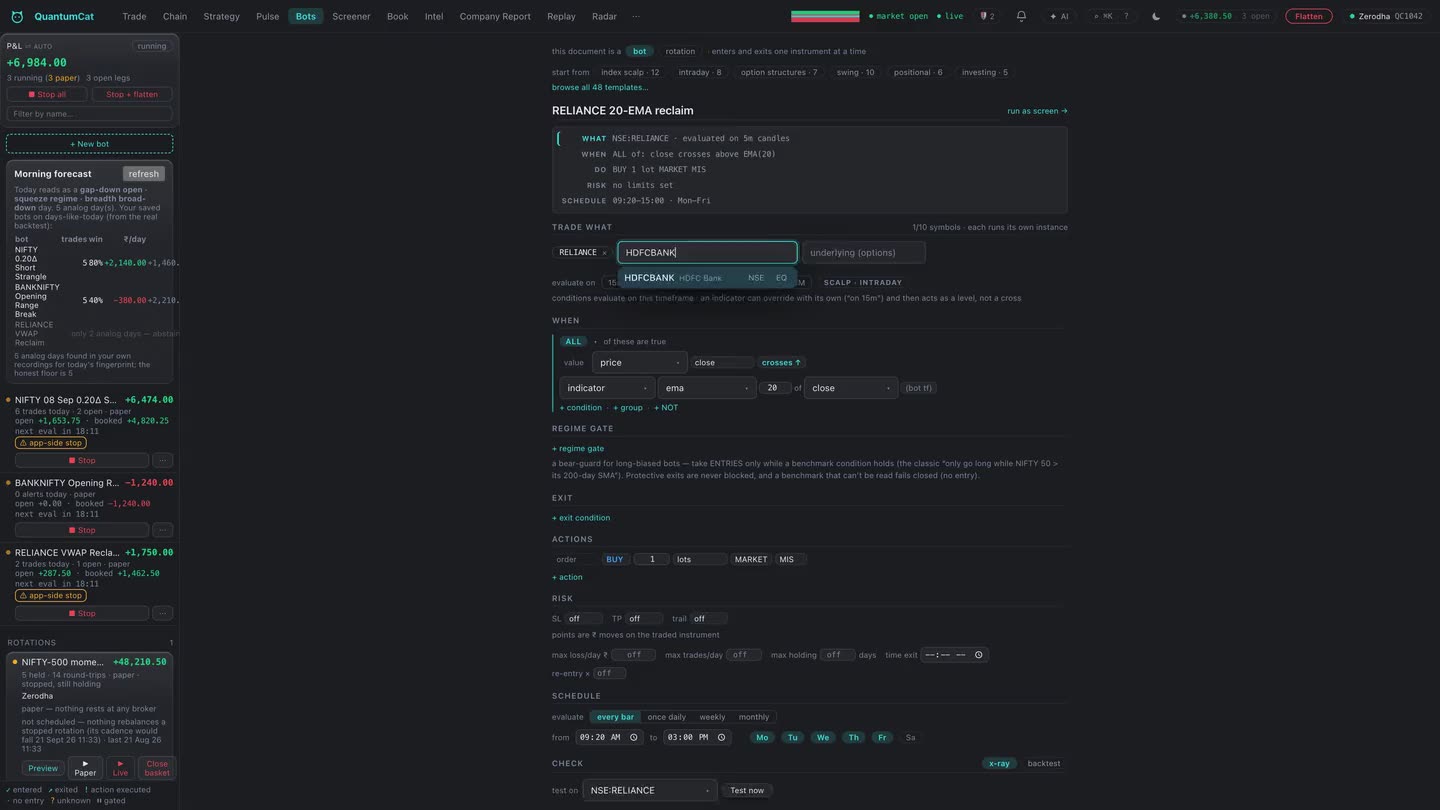
QuantumCat's builder is a real expression tree — nest conditions as deep as your idea goes, trade multi-leg option structures, and gate everything behind risk blocks. Every bot runs on your machine, paper-first, against your broker.
Option structures built-in
Straddles, strangles, iron condors, spreads — legs picked by ATM offset, delta target, or premium. One block, whole structure.
Risk is a first-class block
Stop-loss, targets, trailing (points / % / ATR), re-entry caps, time exits, daily max-loss. The bot stops itself before you have to.
Screeners are separate
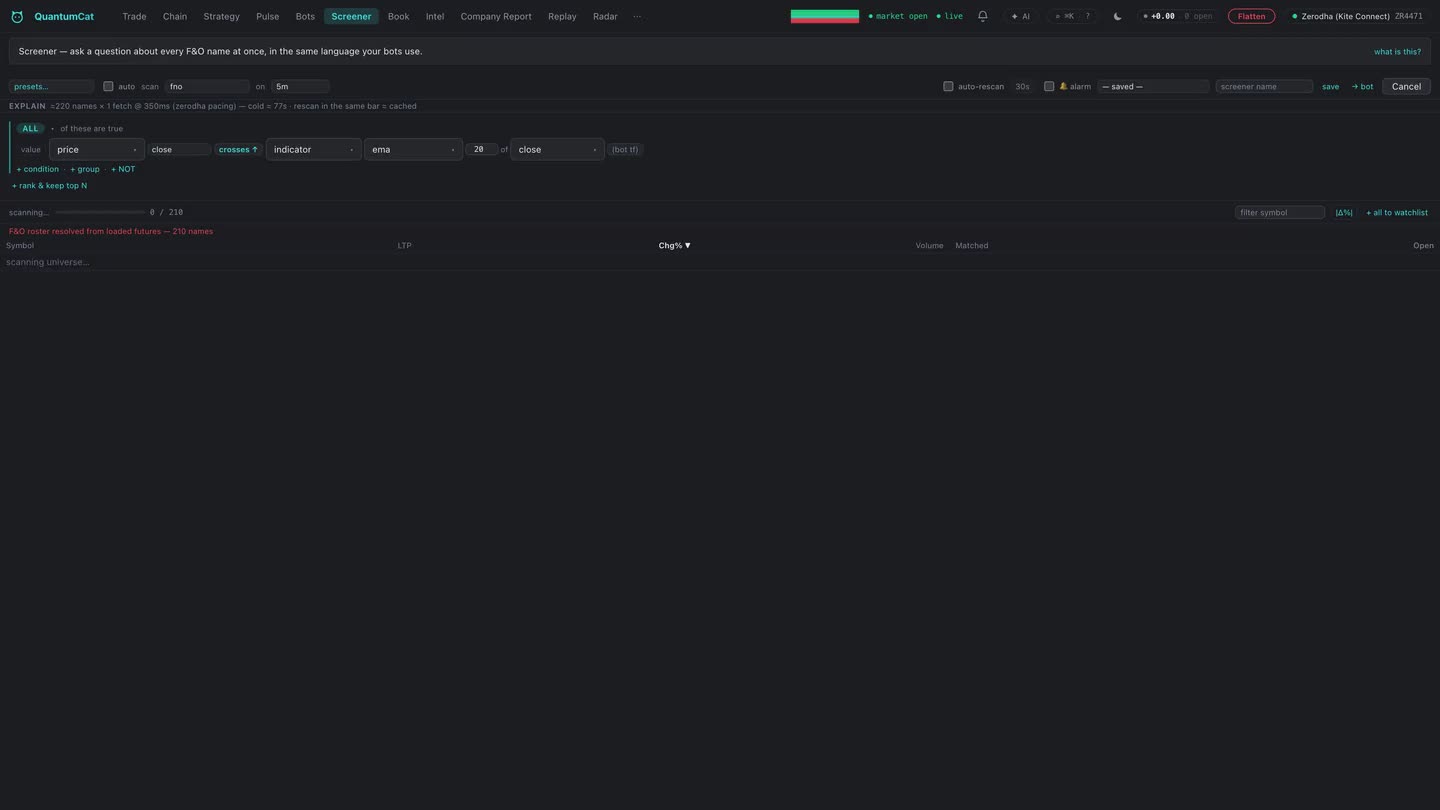
Same expression power pointed at the whole market — stream matches live, click one to load it into the ticket.
Backtests that refuse to lie
Signals on the close, fills on the next bar's open — look-ahead is structurally impossible. And if a bot reads live-only data the replay can't reproduce, the backtester refuses to run and tells you exactly why.
Charges included, always
Every simulated trade pays estimated brokerage, STT and levies — because a strategy that only works before charges doesn't work. Win rate, profit factor, drawdown and the full trade list, net.
Tick-verified fills
When a backtest bar touched both your stop and your target, QuantumCat consults your recorded tape and lets the actual tick sequence decide — pessimism only where there's no evidence.
Your own tick archive
From day one, the terminal records every tick it streams to your own disk. It compounds every session you run — and it's what powers tick-verified backtests and market replay.
Market replay
Play any recorded session back at 1× to 300× — price path, session VWAP, scrub bar. Practice the open twenty times before you trade it once. Replay shares the terminal's data, never its order engine.
Paper first, by default
Every bot starts in paper mode — fills simulated locally against live prices. Going live is a deliberate flip, never the default. Real money deserves a rehearsal.
AI Assistant
An AI that runs the terminal for you.
It never trades on its own.
It sits in a panel next to whatever you're working on (⌘J / Ctrl+J) and you just tell it what you want — why didn't my straddle bot fire today?, build a BANKNIFTY iron condor and backtest it on last month, flatten everything. It reads your book, works the terminal, and shows you each step as it goes. And it runs on your own ChatGPT plan, not ours: we don't charge for the AI, we don't store any keys, and nothing routes through a server in the middle.
Just ask
"Why didn't my straddle bot fire today?" · "Scan F&O and note your best three ideas with levels and alerts." · "What's moving IT stocks?" It looks at your positions, the live tape and the chain — and searches the web when a question needs it.
It does the work
There are 81 things it can actually do — pull data, build and backtest a bot, run a screener, log an idea, fill in an order. Whatever it touches shows up as a line in the panel, so you always see what it did.
You send it
It won't fire an order by itself. It fills in your normal ticket — the same one you use by hand, with the same checks — and leaves it for you. You look it over and press the button.
It can't get at your keys
The tools that could read your broker keys or change your risk limits just aren't available to it — they're not in its toolbox, so there's nothing to work around. And anything it reads (a quote, a headline, a bot's name) is treated as information, not orders. If a web page tells it to "go place a trade", that goes nowhere: what it's allowed to do is set by the app, not by anything it reads.
Hands-free trading is opt-in
If you want it placing orders on its own, you switch that on deliberately — you type ARM and set the limits: how many orders, how big, how much you're willing to lose, and how long before it turns itself back off. It's never remembered; close the app and it's off again, and one click (or the kill switch) stops it cold.
The kill switch still wins
On its own or armed, every order goes through the same risk checks, daily-loss limit and kill switch as one you place yourself — arming just puts a tighter leash on top. Hit the panic key and it shuts the assistant down and cancels whatever it's doing before it flattens.
It keeps notes
There's an Idea Board where it writes trades down — entry, stop, target, a line on why — and it can set price alerts at those levels (it won't place the trade). It hangs on to notes between sessions, and if you like, it'll write you a quick read before the open and a wrap after the close.
Nothing to set up by hand
No command line, ever. It installs the engine for you from the official source and keeps it current. You sign in on ChatGPT's own page in your browser, so your password never goes near QuantumCat.
Your plan, your machine
It runs on your own ChatGPT subscription, on your own computer, against your own broker. None of it sits on a QuantumCat server, because there isn't one — same as the rest of the app.
You'll need your own ChatGPT Plus or Pro plan. We don't charge extra for the AI, don't store your ChatGPT login, and never see your password. And like Pulse and Intel, it's here to help you decide — not to tell you what to trade.
Your keys. Your machine.
We don't even run servers.
QuantumCat is software you own, not a service that owns you. There is no QuantumCat cloud between you and your broker — orders go from your machine to the exchange member you already trust.
Add API keys once
Your broker's API key and secret, stored in your OS keychain — macOS Keychain, Windows Credential Manager — or an encrypted vault on your own server for the web app. Never synced, never seen by us.
Sign in each morning
One click opens your broker's own login page in your browser — password and TOTP are typed there, never inside QuantumCat. The day's session is captured automatically and restored on relaunch.
Trade
Everything — ticks, orders, Pulse, bots — runs locally against your broker's official API. Close the app and nothing of yours is anywhere else.
New to broker APIs? The step-by-step setup guide → walks you through creating your Zerodha, Dhan or Angel One key, signing in, and the one-time IP registration.
Get early access
Free while in beta — every feature, nothing gated. Tell us your platform and
we'll email your download right away.
macOS (Apple Silicon M1–M4 and Intel) and Windows all run today.
Pricing
Early access
- Every feature — nothing gated
- Zerodha & Dhan connectors
- Fill preview & risk-sized one-keystroke orders
- QuantumPulse, Intel, bots, backtesting, replay
- AI assistant — on your own ChatGPT plan
- macOS (Apple Silicon & Intel) and Windows — all available today
Launch pricing
- Simple monthly plan, priced for retail
- Early-access users get founder pricing, forever
- Your broker account, your data — never the product
Questions, answered straight.
What exactly does QuantumCat add to my trading day?
QuantumCat is built for the person who trades every day: order-flow detection (Pulse), fill preview for your exact size, one-keystroke risk-sized orders, TradingView charts backed by your own tick archive, a backtester that charges you virtual brokerage, market replay for rehearsal, and FII/DII + positioning + calendar context beside the ticket. Same broker, same account, same safety — a sharper cockpit.
Is QuantumCat a broker?
No. QuantumCat is a terminal that connects to your existing broker account through that broker's official public API. Your money and securities stay with your broker; every order is executed by them under your credentials.
Do my keys or orders ever touch QuantumCat's servers?
No — there aren't any. API keys live in your OS keychain (or an encrypted vault file on your own server for the web app). Orders travel from your machine to your broker, full stop.
Which brokers work today?
Zerodha (browser sign-in, including automated daily login), Dhan (access token — and the only one serving 20-level depth today) and Angel One (client code + MPIN + TOTP) all ship today. Each is modelled as it actually behaves, so a control a broker doesn't support is disabled with the reason rather than silently ignored — see brokers & sessions. Upstox and Fyers are next; the broker layer is one adapter file per broker. New to broker APIs? The setup guide walks you through keys, sign-in and IP registration.
What happens to my stop-loss if my laptop dies?
Nothing bad — that's the point. OCO brackets and break-even stops are standing triggers (GTT) on your broker's servers, not in the app: on stocks they stay live for up to a year, on F&O for the life of the contract. Two honest caveats your broker also states: a trigger fires once (if its order is rejected it isn't re-armed), and a triggered order isn't guaranteed a fill any more than any other order. The only piece that needs the app running is the trailing advance — if the app closes mid-trail, the last planted stop stops ratcheting but keeps protecting you at the broker. The UI labels every feature broker-side or app-side so you always know which guarantee you're holding.
Can I trust the backtester?
You can trust it not to flatter you. Signals evaluate on closed candles and fill at the next bar's open, stops take priority inside each bar, and every simulated trade pays estimated Indian charges. If a strategy depends on live-only data the replay can't reproduce, the backtester refuses to run it and says why. It's still a candle-level simulation — treat results as directional, and paper-trade before going live.
Is QuantumPulse investment advice?
No. Pulse measures what is happening in the market microstructure and shows you the evidence trail-by-trail. It never recommends a trade, and it can be wrong — markets don't owe anyone a pattern. You decide, you own the risk.
How does the web app work if there are no servers?
You run a small gateway program on a machine you control (your Mac, a home server, a cheap VPS). It serves the app to your browser and talks to your broker from there. Bind it to localhost or put it behind a VPN like Tailscale — the docs walk you through it.
What about exchange rules for automated orders?
Bots place orders through your broker's official API within the broker's rate limits, and paper mode is the default. Depending on your broker and strategy, exchange algo regulations may apply to you — read your broker's API terms, and when in doubt, ask them. QuantumCat gives you the tools; compliance with your broker's terms is yours.
Does the AI place trades on its own?
Not unless you tell it to. Normally it just fills in your order ticket and leaves it for you to send — same checks, same confirm button as always. If you do want it trading hands-free, you turn that on yourself by typing ARM and setting limits: how many orders, how big, a loss cap, and a timer that switches it off. It forgets all that the moment you close the app, and the kill switch stops it. Even when it's armed, every order still runs through your usual risk checks and daily-loss limit. And it can't get at your keys or risk settings — those just aren't things it's able to do.
Do I have to pay QuantumCat extra for the AI?
No — but you do need your own ChatGPT Plus or Pro plan. It runs on your subscription, on your machine. We don't charge for the AI, we don't store any keys, and there's no server passing your requests around. Setup is one click (it installs and updates the engine for you, no command line), and you sign in on ChatGPT's own page, so your password never touches QuantumCat. No ChatGPT plan just means no assistant — everything else works exactly the same.